
What are eBay sold comps and how do you find them?
eBay sold comps are the actual prices buyers paid for completed transactions, not the asking prices sellers hope to get. That distinction matters more than most new resellers realize. Active listings are guesses. Sold comps are evidence.
To pull them on desktop, run a search, then check "Sold Items" in the left sidebar under "Show only." On mobile, tap Filter after searching, scroll to "Sold Items," and apply. Both methods surface roughly 90 days of sales data, with final prices displayed in green. Unsold completed listings appear in red, which tells you what price the market rejected.
For deeper history, eBay Product Research inside Seller Hub (formerly Terapeak) goes back several years, covering average price, sell-through rate, and total units sold. Your own sales history in Seller Hub reaches back two years.
Pro Tip: "Completed listings" and "Sold listings" are not the same filter. Completed shows both sold and unsold results. Always enable both to see the full picture: what sold and what didn't.
Table of Contents
- Common pitfalls that will wreck your pricing
- Best practices for pricing with sold comps
- Tools for accessing and analyzing sold data
- Legal and ethical considerations when using sold data
- Key Takeaways
Common pitfalls that will wreck your pricing
Relying on active listings for pricing is the most common mistake resellers make. Those prices reflect seller optimism, not buyer behavior. Anchoring to them leads to overpriced inventory that sits.
Bad comp selection is the second trap. Including the wrong model, a bundle, a parts-only listing, or a damaged item poisons your data set. A $40 sale with free shipping is not the same economics as a $40 sale with buyer-paid shipping, and mixing them distorts your net profit calculation.
Small sample sizes amplify the problem. Three comps that include one outlier can swing your price target by 30% or more. Precision in your initial search beats volume every time.
- Exclude bundle and lot listings unless you are selling a bundle
- Filter out parts-only and damaged items unless that matches your item
- Ignore "Best Offer" strikethrough prices; the displayed amount is not what the buyer paid
- Match condition exactly: tested, untested, open-box, and sealed all clear at different prices
Best practices for pricing with sold comps
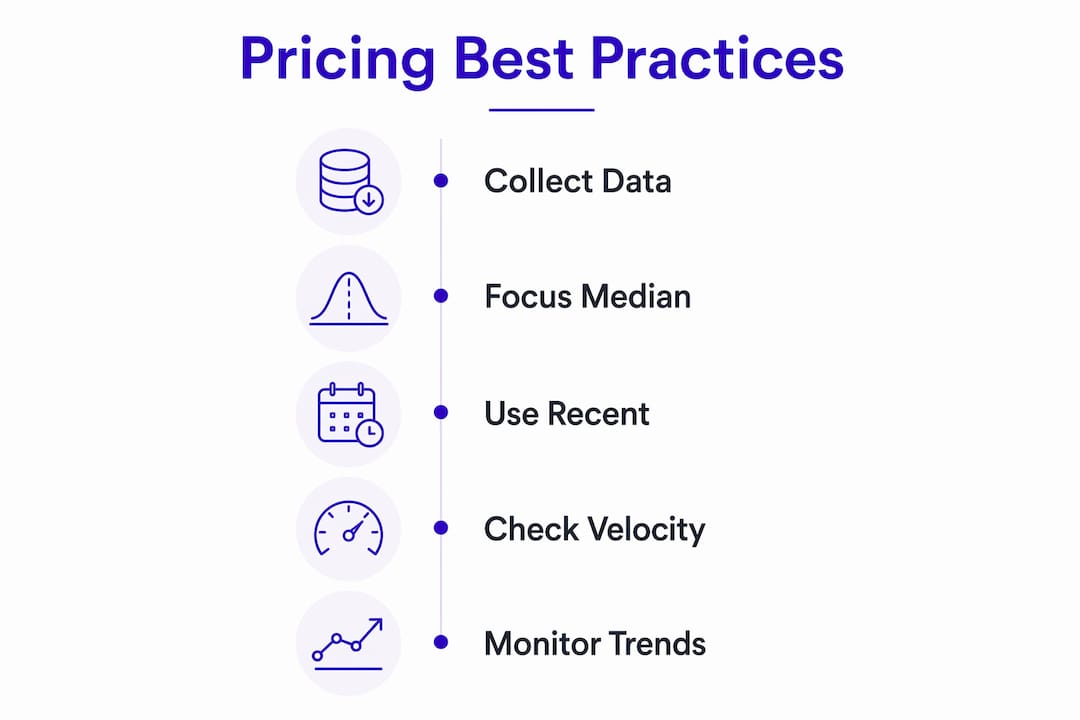
Focus on the median sold price, not the average. One outlier sale, say a rare variant or a lot, inflates the mean without reflecting what your typical buyer will pay. The median gives you the true market middle.
Aim for 5 to 15 recent, well-matched comps. If fewer than three items sold in 90 days, the product is low-velocity and you need a higher margin to justify the slower turnover. Always factor in eBay fees, which run approximately 13% of the final sale price, plus shipping costs, before calculating net profit.

Pay attention to how fast items sold. Listings that closed within 1–3 days were priced at or below market. Listings that lingered for weeks signal the price was too high. That velocity data tells you whether to price for a quick flip or hold for maximum return.
Pro Tip: Click a competitor's username to view their recent sold items. Their sold history reveals which products are actually moving in your niche, at what price, and how often, without any keyword guessing.
Sold data also functions as a demand signal. Price trends across 60–90 days tell you whether to source more of an item, hold current inventory, or skip the category entirely.
Tools for accessing and analyzing sold data
eBay's built-in options cover most use cases. The Sold Items filter handles quick price checks. Seller Hub's Product Research tool handles seasonality and trend work. For sellers who need to check retail category trends across platforms, third-party tools fill the gaps.
| Tool | Data depth | Best for |
|---|---|---|
| eBay Sold Items filter | ~90 days | Quick per-item price checks |
| eBay Product Research (Seller Hub) | Up to ~3 years | Seasonality, trends, sell-through rate |
| Seller profile "Items sold" | ~90 days | Competitor catalog analysis |
| SoldComps API | Up to 240 results per request | Bulk pricing, automation, app development |
The SoldComps API deserves a closer look for sellers who price at volume. A single GET request returns up to 240 completed eBay sales, each with sold price, shipping cost, condition, sold date, and seller feedback. It covers eight eBay marketplaces including the US, UK, and Germany, and requires no eBay developer account or OAuth setup. For estate sales, bulk sourcing, or any workflow where manual search doesn't scale, that kind of programmatic access changes the math on how long pricing takes.
Resell-ready takes a different angle, pulling live resale prices from eBay alongside Depop, Mercari, Poshmark, Grailed, and Vinted in one interface, with AI-powered buy/skip verdicts and suggested pricing built in.
Legal and ethical considerations when using sold data
Viewing and using eBay sold listing data for pricing research is entirely legal. eBay makes this data publicly accessible, and using it to inform your own pricing is standard practice across the reselling industry.
The ethical line sits at how you use competitor data. Studying a seller's sold history to understand market demand is fair game. Copying their exact listing titles, photos, or descriptions crosses into intellectual property territory. Scraping data at scale through unauthorized means may also violate eBay's terms of service, which is why purpose-built APIs like SoldComps exist as a compliant alternative.
Price-fixing agreements with other sellers, even informal ones coordinated through reseller communities, can raise antitrust concerns under US law. Using sold comps to set your own prices independently is the correct approach.
Key Takeaways
Accurate pricing from eBay sold comps requires clean data, the right tools, and an understanding of what the numbers actually mean.
| Point | Details |
|---|---|
| Sold beats active listings | Sold comps show what buyers paid; active listings show what sellers hope to get. |
| Median over average | The median filters out outlier sales and gives a truer market price. |
| 5–15 matched comps | Very few sold comparable sales in recent months signals a low-velocity item needing higher margins. |
| Factor in fees and shipping | eBay fees run a significant portion of the final sale price; always net these out before calculating profit. |
| APIs scale the process | SoldComps API returns up to 240 completed sales per request for bulk or automated pricing. |