
Try ListFlow, Relistly, Underpriced AI, and Closo first. Each one lets you cross-list items to multiple platforms for free, and each solves a slightly different problem. ListFlow markets a free-forever plan with one-click posting to eight or more marketplaces. Relistly adds bulk import for anyone listing in batches, capped at a free tier before it asks for money. Underpriced AI auto-fills listing forms and pulls your photos over in one pass, which matters most if you're doing this one item at a time. Closo throws in auto-delist, so a sale on eBay pulls the same item off Poshmark before someone else buys it twice.
If you list fewer than 25 items a month, start with a browser extension. If you're clearing out a closet in bulk, prioritize the bulk importer instead.
Key Takeaways
Free cross-listing tools save time on posting, but only a data-first platform like Resell-ready protects your margins as your reselling volume grows.
| Point | Details |
|---|---|
| Start with a browser extension | ListFlow, Relistly, and Underpriced AI all let you cross-list items to multiple platforms free with minimal setup. |
| Match the tool to your volume | Low-volume sellers want one-click speed; bulk sellers need import tools and higher free-tier caps. |
| Prioritize auto-delist for pricier items | Closo's automatic delisting cuts real double-sell risk that a manual reminder can't fully prevent. |
| Confirm free-forever versus trial | Flyp's 100-day window and ListFlow's free-forever claim are not the same offer, so check before you commit. |
| Upgrade when sourcing becomes the bottleneck | Resell-ready adds ROI tracking, inventory dashboards, and supplier verification once listing speed stops being the problem. |
Table of Contents
- How Do You Cross List Items to Multiple Platforms for Free?
- How Should You Pick a Free Cross-Listing Tool?
- How Do You Cross List an Item in Under 60 Seconds?
- Which Tool Fits Your Selling Style?
- When Should You Outgrow Free Cross-Listing Tools?
- Free Listing Tools Save Time, But They Don't Save Money
- A Different Kind of Tool for Sellers Ready to Scale
- Sources
How Do You Cross List Items to Multiple Platforms for Free?
You install a browser extension, connect your marketplace accounts, and let the tool copy your listing details across platforms instead of retyping everything by hand. That's the entire model behind every free cross-listing tool on the market right now, and it's why casual resellers have started using them instead of manually reposting the same sweater on five different apps.
The tools differ in three places: how many marketplaces they reach, how generous the free tier actually is, and whether they help you avoid double-selling the same item. ListFlow leans hardest into free access, advertising support for Poshmark, eBay, Mercari, Depop, Facebook Marketplace, Etsy, Vinted, and Grailed under a plan it calls free forever. Relistly caps its free tier at a set number of listings, often around 25, which is plenty for someone testing the waters but tight for a serious flipper. Closo skips the cap on cross-listed items entirely and focuses instead on the safety net: automatic delisting when something sells.
A few things worth flagging before you install anything:
- ListFlow's "free forever" language is the vendor's own claim. Test it on a handful of items before you trust it with your entire closet.
- Relistly's 25-listing cap resets your workflow fast if you're clearing out a storage unit. Bulk sellers hit that ceiling in a weekend.
- Closo's auto-delist feature is the strongest double-sell safeguard among the free options, but it only works on the marketplaces it actually connects to. Check that list matches yours.
- Flyp's 100-day free window is a trial, not a permanent free tier. Mark your calendar or you'll get an unexpected charge.
- ResellKit trades feature depth for a simpler setup, which suits someone who wants to be selling in ten minutes, not tinkering with settings.
How Should You Pick a Free Cross-Listing Tool?
Three things decide which tool fits: how much you list, where you sell, and how much a double-sell would actually cost you.
- Volume and bulk needs. If you're listing fewer than a dozen items a week, a one-click browser extension beats a bulk importer every time. If you're processing a bin of thrifted finds in one sitting, bulk import stops being a nice-to-have.
- Marketplace overlap. Match the tool to where you actually sell. A tool that covers Poshmark, eBay, and Mercari does nothing for you if your inventory lives on Depop and Vinted.
- Double-sell risk tolerance. A $12 t-shirt selling twice is annoying. A $300 handbag selling twice is a refund, an angry buyer, and possibly a platform strike against your account.
Before installing anything, answer these three questions: How many marketplaces do you actively sell on? How many items do you list in a typical week? Would a double-sell cost you money, time, or your seller rating?
Run any candidate tool through this checklist:
- Does it support the marketplaces you actually use, not just the ones it advertises loudest?
- Does it offer auto-delist, or at least a same-marketplace sold reminder?
- Is the free tier big enough for your monthly volume, or will you hit a wall in week two?
- Does it require a credit card to start, or is access genuinely free?
Pro Tip: Install two tools side by side on a throwaway listing before committing to one. The permissions prompt and the speed of the auto-fill tell you more in five minutes than any vendor's landing page will.
How Do You Cross List an Item in Under 60 Seconds?
A browser extension can push one item to two marketplaces faster than you can manually retype a single description, and here's exactly how that happens.
- Install the extension and grant the permissions it asks for. Most cross-listing tools need access to read and modify marketplace pages, which sounds alarming until you remember that's the entire job. Test it on one low-stakes listing first.
- Select your target marketplaces. Pick two to start, not all eight the tool advertises. You want to see how the form auto-fill and image transfer actually behave before trusting it with your whole inventory.
- Confirm the auto-filled fields. Title, price, and description usually copy over cleanly. Category matching is where extensions stumble most, so double-check that before you post.
- Adjust pricing per platform. eBay fees run higher than Poshmark's on some tiers, so the price that works on one platform may need a small bump on another.
- Post and verify. Check both listings went live with matching photos and correct pricing.
Once it's live, protect yourself against double-sells:
- Mark the item as listed in whatever inventory system you use, even a basic spreadsheet.
- Turn on auto-delist if your tool offers it, since that's the only real defense against selling the same shirt twice.
- Manually pull the item from every other platform the second it sells, especially if your tool only reminds you instead of acting automatically.
Which Tool Fits Your Selling Style?
Not every reseller needs the same setup, and picking the wrong one wastes more time than it saves.
- Closet and low-volume sellers. A one-click browser extension like ListFlow or Underpriced AI saves you a few minutes per item, which adds up fast when you're only listing five or six things a week.
- Small-batch flippers. Bulk import paired with auto-delist, the combination Relistly and Closo lean into, matters more than raw speed once you're listing a dozen or more items in one sitting.
- Weekend and mobile sellers. Look for paste-kit style features or a share sheet you can use from your phone between errands, since you're rarely sitting at a desktop when inspiration to list something strikes.
None of these tools do your sourcing math or tell you whether an item was worth buying in the first place. That's a separate problem, and one that matters more the bigger your operation gets.
When Should You Outgrow Free Cross-Listing Tools?
Free extensions solve one problem: getting an item posted in more places without retyping it eight times. They don't tell you whether that item was worth buying, what your real margin looks like after fees, or which supplier is quietly cutting into your profit on every unit.
That's the gap Resell-ready is built for. It's a command center for resellers who've moved past casual listing and into actual sourcing decisions:
- ASIN-level insight for evaluating what to buy before you buy it
- Automated ROI and net profit tracking instead of a spreadsheet you forget to update
- An inventory dashboard that tracks capital tied up in stock, not just what's listed
- A verified supplier database for sourcing beyond guesswork
Cross-listing tools save you minutes. Sourcing and margin tracking save you money, which is the trade a growing reseller eventually has to make.
Free Listing Tools Save Time, But They Don't Save Money
Here's what the conventional advice gets backward: most guides treat cross-listing speed as the whole game. It isn't. Speed just gets your inventory in front of more buyers faster. It says nothing about whether that inventory was priced right to begin with.
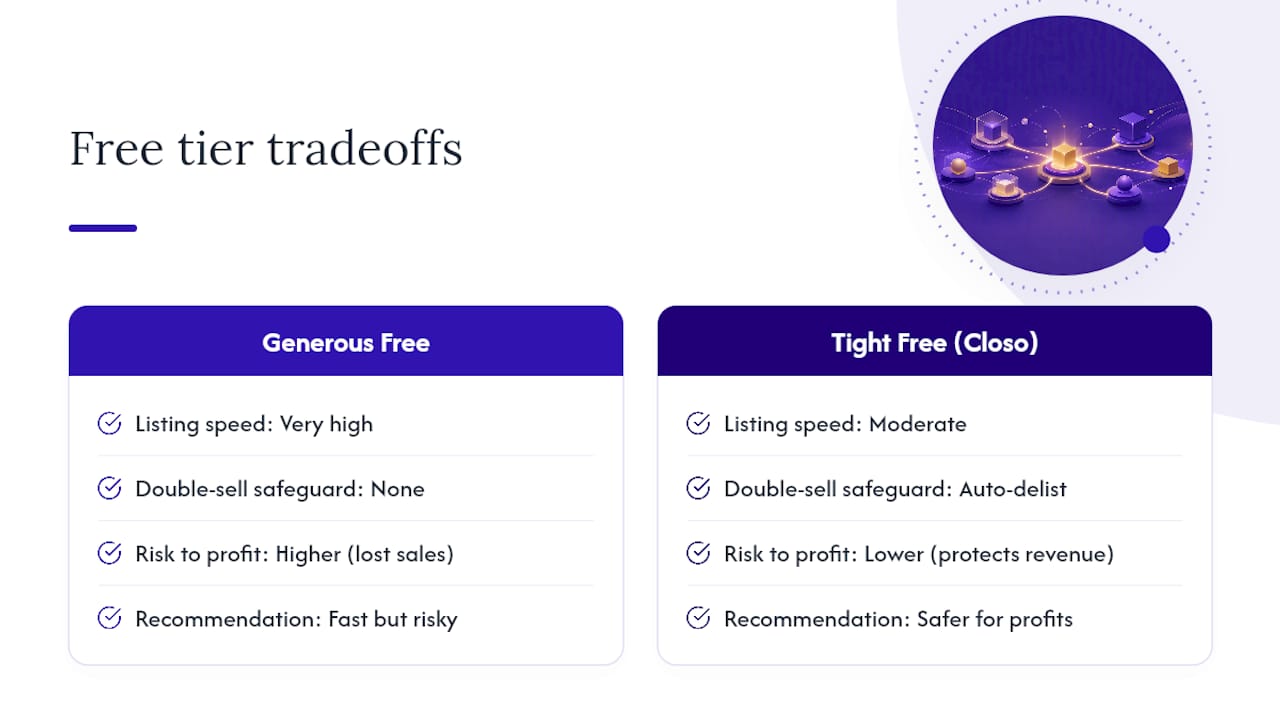
I'd push back on the idea that "free forever" is automatically the smartest pick, too. A tool with a tighter free tier but an actual auto-delist feature, like Closo, protects you from a real financial loss. A generous free tier with no double-sell safeguard just lets you make the same mistake faster and across more platforms at once.
The reader who gets the most out of this advice is the one who treats cross-listing as a solved problem and moves on. Install one extension, learn its quirks in a week, and stop shopping for a "better" free tool every month. The real leverage in reselling isn't in how fast you list. It's in knowing what to buy, what it's actually worth, and when a listing tool has done all it can for your business.
— Christian
A Different Kind of Tool for Sellers Ready to Scale
ListFlow, Relistly, Closo, and the rest handle the listing side of reselling well. They don't touch the part that actually determines whether you're making money: knowing what to buy, what it's worth, and how your margins hold up once fees and shipping eat into the sale price.

Resell-ready picks up where those tools stop. Paste an ASIN and get an instant read on resale value and expected margin before you spend a dollar sourcing it. Track your capital across every open listing with an automated inventory dashboard instead of a spreadsheet that's three days out of date. Pull from a verified supplier database instead of gambling on a random Alibaba listing. It's built for sellers who've stopped asking "how do I list this faster" and started asking "is this worth buying at all."
If you're managing enough inventory that margin tracking has become a real headache, check the eBay & Amazon price research tool and see what a sourcing decision looks like when the math is already done for you.